Ball Throwing Lab
(THIS IS COPIED FROM THE INFO TAB)
## WHAT IS IT?
This netlogo model has two main parts to speek of, the aesthetics and the actual physics. The part of the code that draws USN and the part of the code are two very seperate systems, though they depend on each other frequently. For this reason, this section will be broken down into four subsections:
* Coding
* Physics and Other Sciency
* Art
* The "Cool" Part, where everything comes toghether.
## HOW IT WORKS
### Coding
This model is a bit less clean then the previous model, though a lot more is working correctly.
At the surface level, this is a normal netlogo model. It uses a setup and go, and updates at 100 ticks / second. I use that tps to adjust the velocity and acceleration of the ball, etc.
To understand the code, it might be helpful to see a general outline of the excecution:
1. __Setup__
(a) setting constants and plot values, which consists of
* the nice magic numbers I use for artistic purposes
* resizing the world to fit the thrown ball
* resizing the plot ranges to nicely fit the world.
(b) making all of the people for the simulation immersion
* two ppl on the roof of a random color
* the tall german kid
* the officer that was almost killed
* (I don't know why these didn't render as bullets, sorry)
(c) art!
2. __Go__
a) moving the ball and updating its position and velocity
b) doing math to get the officer to move to the ball (see disclaimer in the code)
c) updating the charts and stuff
this worked out pretty well, and I think I did a good job of orgnanzing the code. There are certainly quite a few practices that are less-than-optimal (lots of global state) and not efficent, but it works.
Whenever I needed to get the ball, I was too lazy to make the ball a seperate breed, so I just used this snippet a bunch:
`
let ball one-of turtles with [ shape = "circle" ]
`
which makes accesing the ball an O(n) operation every time, but it works...
I stop the ball whenever it hits a green patch. works pretty well, and I was able to base some of the art off of this.
**`turtles-own`**
* `x-pos`, `y-pos` - position in world units
* `x-vel`, `y-vel` - velocity components
* `x-acc`, `y-acc` - acceleration components (y-acc is set by g slider)
**`globals`**
* `grass-modifier` - vertical offset for ground styling
* `bulding-lside` - x-offset for left side of building (UI art/layout)
* `building-lside-height` - top y of the left‑side building face (roofline)
* plot-xvel-name, plot-yvel-name - titles for velocity plots
**Sliders**
* `initial-speed` (m/s)
* `initial-angle` (degrees)
* `height-of-building` (world units)
* `g` (gravitational acceleration)
### Physics
This model moves the ball forward each tick by using the a² + b² = c² formula on its velocities each tick. Nothing fancy :)
The ball stoping is one of the instances where the physics system interacts with the art. See this line of code:
` ifelse [pcolor] of patch-here = green [ set x-vel 0 set y-vel 0 set y-acc 0 ] [ set heading atan x-vel y-vel ]`
And you will notice that it doesn't matter exactly what x-position it's on, or really what y-position, as soon as it hits a patch of green, it stops. Could this be called fugged? Maybe? But it works.
I also used the fact that you can calculate the peek height of the throw and the max range of the throw with kinematic equations. It was a decently fun process to figure out how to resize the world based on the throw settings.
There are a couple 'Magic Numbers' used in the calculation of the max height and width, namely, adding 25 and 18, but my only explanation is "it seemed nice".
### Art
There are two main spots where I implmented the art:
* resizing the world
* drawing usn
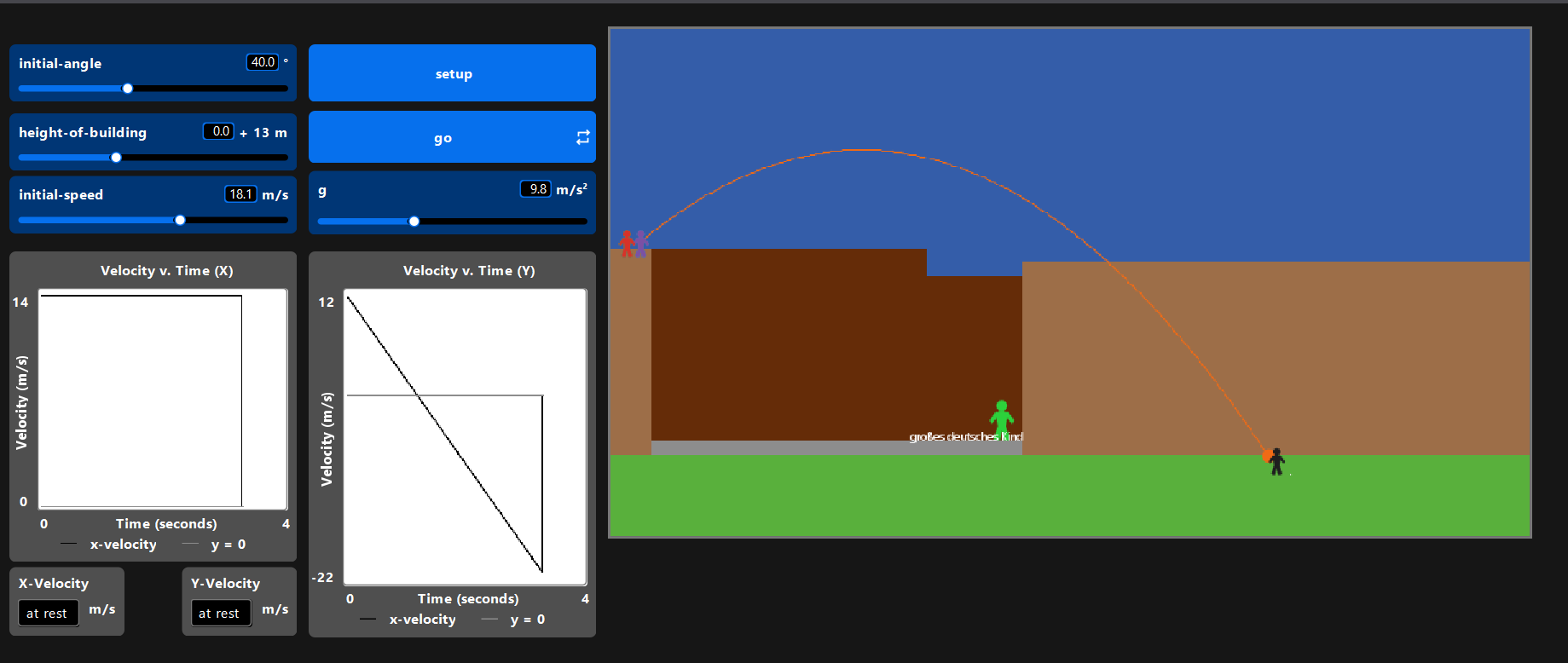
A lot of the charm of this model comes from throwing the ball at something recognizable. I tried my best to make something that looks like that part of USN we filmed (including two roof people, the tall German kid, the unlucky officer). They are all placed carefully, and I try and do rudimentary shading to the building to give some linear perspective. Note that I don't draw the walkway to the other building, I just extend a wall indefinatly, which actually looks really good!
Most of the magic numbers in the code are based off of `draw-usn`. To be punctual with making this program, I resorted to intuition with what numbers looked right.
I also spent ~10 minutes fidling with aligning and sizing the widgets. This was likely a waste of time, considering the brevity of this project, but I thought it was cool :)
I also wanted to have the officer always approach the ball. See the disclamer in the code section.
## HOW TO USE IT
press setup
press go
fiddle around with the sliders
## Replicating Experiments
For the horizontal throw:
* set the velocity to 6.8m/s
* set the the angle to 6.73°.
* set the height modifier to 0m
* set g to 9.8 (or use our labs calculated result, 8.56)
It should land somewhere within the middle of the brown blob
For the power throw
* set the velocity to 18.1m/s
* set the angle to 39.1°.
* set the height modifier to zero
* set the g to 9.8
It should go high and far; if you can imagine the walkway that is supposed to be there, midway between the walkway and the other building.
## THINGS TO TRY AND NOTICE
Set the sliders to extreme values and see how the world adapts. I have not yet set g to -1, maybe this is a thing we can do in class...
## EXTENDING THE MODEL
more sliders would be cool
## NETLOGO FEATURES
- `resize-world`
- monitors
- labels
## CREDITS AND REFERENCES
- netlogo dictionary
- see last function.
Download
Leave a comment
Log in with itch.io to leave a comment.